Real Time Phone Locator GPS
Nova Xponential PowerMaps & Navigation
0.00.00 Reviews
- Version
- 1.0.2
- Installs
- 10.00K
- Age Rating
- Everyone
Screenshots
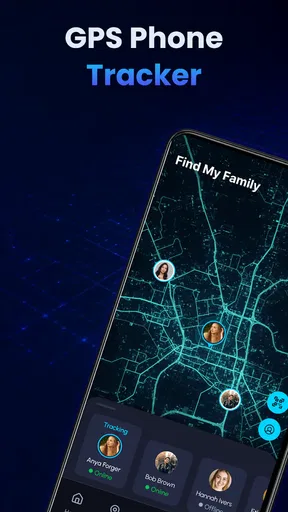

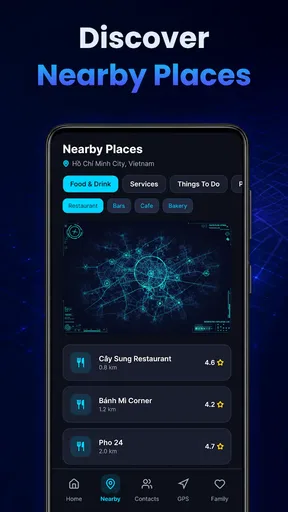
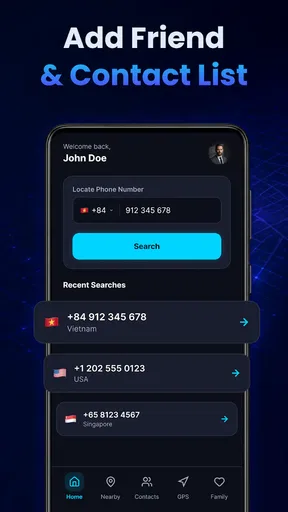
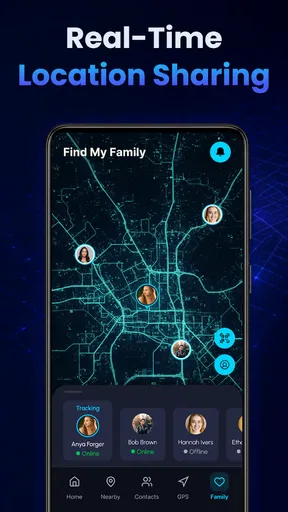
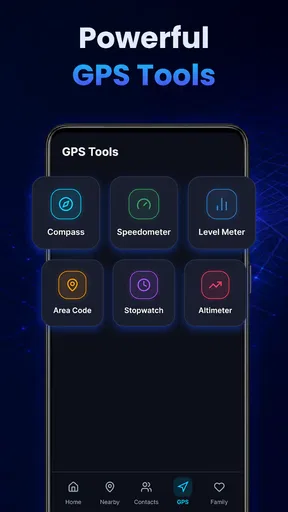
Our Review of Real Time Phone Locator GPS
 Analysis by Appyee
When I tested Real Time Phone Locator GPS, I found that its main appeal is easy to understand: it puts phone location sharing and nearby discovery in one straightforward Maps & Navigation app. That sounds simple, but the practical value depends on how comfortably you can use GPS tools in everyday situations. I see it as a lightweight option for people who want a direct way to stay connected while moving around, rather than a full replacement for a mature navigation platform.
The app is free, aimed at everyone, and developed by Nova Xponential Power. Its store summary focuses on staying connected, sharing your location, and exploring nearby places, while the short description presents it as a real-time phone locator. Those details point to a focused experience rather than an oversized travel suite. I approached it as a tool for quick location awareness: checking where a phone is, helping someone find me, or using nearby places as a starting point when I am already out.
Location sharing is the feature that matters most
The strongest idea here is not simply seeing a map. Most phones already include a map application, and many of them can display a device’s position. The useful distinction is the social side of location: sharing where I am so another person can orient themselves without a long explanation by text or a sequence of landmarks.
In practice, that can remove a surprising amount of friction. If I am waiting outside a large building, meeting a friend at a busy station, or trying to guide a family member through an unfamiliar area, a location-based tool can be clearer than writing, “I am near the entrance, beside the café.” The benefit is greatest when the other person needs a current point of reference rather than a complete route plan.
The real strength is reducing uncertainty between two people. Real Time Phone Locator GPS makes more sense when location sharing is the central task, not when I need detailed turn-by-turn planning, public transport schedules, or a broad travel-planning workspace. That distinction is important because it prevents disappointment: this is best judged as a focused locator and nearby-place tool.
I also like the idea of using the app as a temporary coordination aid. For example, I might share my position while walking toward a meeting point, then stop relying on it once we meet. That is a different habit from permanently tracking someone, and it is a healthier way to use any location-sharing application. The app’s value comes from deliberate, situation-based sharing rather than treating a location screen as a substitute for communication.
What the GPS capability changes in daily use
GPS turns a vague conversation into a visual one. Instead of describing a route from memory, I can use the phone’s position as the common reference. This is particularly useful when streets look similar, when an entrance is set back from the road, or when a large venue has several access points. A nearby-place view can also help me choose a recognizable meeting point instead of asking someone to find an obscure address.
There is a subtle trade-off here. A map pin can show where a phone is, but it does not automatically explain why the person is there, which entrance they are using, or whether they are still moving. I would still send a short message when precision matters. “I am at the north entrance” is more useful than assuming the map alone tells the whole story.
This is one of the app’s less obvious lessons: location sharing works best as a supplement to ordinary conversation. The app can provide the visual anchor, while a brief message supplies context. Used that way, it can make meetups smoother without encouraging people to overinterpret a changing GPS position.
How I would use it before sharing a location
Before opening the sharing function, I would decide who actually needs the information and for how long. That small step matters because location is personal, even when the purpose is harmless. A friend waiting for me at a venue may need a temporary update; a larger group may only need the meeting point. I would avoid sharing more widely than the situation requires.
I would also check the map before sending anything. If the marker appears away from the place where I am standing, I would not immediately assume the app is wrong. GPS can take time to settle, and indoor spaces can make positioning less precise. Moving closer to an open area and waiting briefly can produce a more useful reference than sending an uncertain position immediately.
Another practical habit is to use a recognizable destination as the conversation’s anchor. If I am meeting someone at a shopping area, I would share the position and name the entrance or nearby landmark. This combines the app’s location capability with information the recipient can understand quickly. It is more reliable than expecting them to inspect every detail of the map while walking.
How it fits into a normal meetup
Imagine I am traveling to meet a friend in a crowded neighborhood. I arrive first, but the street has several similar-looking corners. Rather than writing multiple directions, I open the locator, use the current position as a reference, and tell my friend which visible landmark to look for. If I start walking toward them, the shared position can help them understand that I am moving instead of waiting at the original spot.
The useful workflow is not complicated, but it is specific: establish the meeting area, share the current position when needed, add a short human explanation, and stop using the location connection when the task is finished. That sequence avoids a common mistake with location apps, which is leaving a sharing session active simply because nobody remembered to end it.
This scenario also shows where the app may not be enough by itself. If the friend needs a precise walking route, a dedicated navigation service may be better. If the issue is finding a business’s opening hours or checking live transport, another specialized app is likely more suitable. Real Time Phone Locator GPS can help people converge, but convergence and navigation are not exactly the same job.
Nearby places are useful when treated as a starting point
The nearby-exploration side adds practical context to the locator. When I am in an unfamiliar area, looking around the current position can help me decide where to meet, where to pause, or which nearby place to use as a landmark. This is more useful than searching from a blank map because the phone’s location gives the search a local focus.
I would not treat nearby results as an automatic recommendation engine. A place being close does not mean it is the best choice, open at that moment, accessible, or suitable for the person I am meeting. I would use the feature to create a shortlist, then check the details that matter before changing my plans.
A good workflow is to search for a practical category, select a visible landmark, and share that landmark in the conversation. This turns the app into a coordination aid rather than a passive list of places. It is also a useful workaround when an exact address is difficult to communicate, especially in a complex building or a busy public area.
Where the experience can become frustrating
GPS is not magic, and the app’s central capability inherits the usual location challenges. Signals can be less dependable indoors, around tall buildings, or in places where the phone cannot establish a clean position quickly. A marker that looks exact on a screen may still be only an estimate. I would leave enough time for the position to settle instead of treating the first displayed point as perfect.
Battery use is another consideration for anyone who keeps location tools active for long periods. I would use the app for the specific coordination task and then close or stop the session when it is no longer needed. That is both practical and respectful. A locator is most comfortable when it is used intentionally, not left running in the background throughout the day.
There is also a human limitation: everyone involved has to understand what is being shared. A person who receives a location may assume it updates continuously, while the sender may think they shared only one position. I would explain the expectation clearly, especially when timing matters. The app can show location information, but it cannot replace agreement between the people using it.
Comparison with familiar alternatives
Compared with the default map app on a phone, Real Time Phone Locator GPS appears more focused on the “where are we relative to each other?” question. A standard maps application is usually the better choice for route planning, address searches, traffic information, and detailed place research. I would choose the familiar map tool when the destination and journey are the main concern.
Compared with a dedicated family-location service, this app may appeal to someone who wants a simpler, less elaborate purpose. A family platform can be preferable when a household needs ongoing circles, repeated alerts, or a broader safety routine. I would not choose a lightweight locator as the central system for complex, long-term family coordination unless its workflow clearly matches everyone’s needs.
Compared with sending a pin through a messaging app, the advantage here is having a location-focused space that also connects the position with nearby places. Messaging remains more convenient when I only need to send one quick update inside an existing conversation. The locator becomes more attractive when I want location awareness and local exploration to sit together rather than switching between separate tools.
That comparison gives me a clear recommendation boundary. Use this app for quick, person-to-person orientation and nearby discovery. Choose a full navigation platform for driving or walking instructions, a messaging app for a one-off pin, and a more comprehensive safety service for ongoing household monitoring.
Who will get the most from it
I think the app suits people who often meet others in unfamiliar places, travel in small groups, or want an uncomplicated way to explain their current position. It can also help someone who is not comfortable giving detailed directions. Sharing a map position and naming one landmark is often easier than describing a route verbally.
It may be especially useful for occasional situations rather than constant use. A traveler arriving at a busy terminal, a friend trying to find a pickup point, or a small group regrouping after exploring an area can all benefit from a focused locator. In each case, the value comes from saving time and reducing confusion at a particular moment.
I would be more cautious about recommending it to someone who expects a complete navigation ecosystem. If your priority is advanced route planning, detailed travel information, or a highly developed set of location-history controls, a larger established platform may fit better. The same applies if every member of a group needs identical tools and a shared long-term routine; simplicity is helpful only when it covers the actual job.
Privacy-minded users should also think about their own sharing habits before installing any location tool. I would use clear, limited sharing, avoid sending a position to unnecessary recipients, and end a session when the meetup or journey is over. Those habits are not decorative extras; they determine whether the app feels controlled or intrusive.
Device support and everyday accessibility
Real Time Phone Locator GPS supports Android devices running version 8.0 or later, which makes it available to people using a range of older and newer phones. Its Everyone content rating also makes the intended audience broad. Even so, the experience will still depend on the phone’s GPS performance, connectivity, screen, and battery condition.
The app is currently at version 1.0.2, and it has passed the early adoption stage with over ten thousand installs. I read that as a sign that the concept has found an initial audience, not as proof that it will replace every established mapping tool. The developer, Nova Xponential Power, has chosen a clear direction: location awareness, sharing, and nearby places rather than an overloaded collection of unrelated functions.
Because it is free, the barrier to trying it is low. That makes it reasonable to test the sharing workflow with a trusted friend before depending on it during an important trip. I would check how quickly the position appears, how clearly the recipient understands it, and whether the nearby-place view helps in the locations I actually visit. A short personal test is more useful than assuming every GPS app behaves identically on every phone.
My recommendation after using the core feature
Real Time Phone Locator GPS is most convincing when I treat it as a practical bridge between a person and a place. Its location-sharing capability can make meetups less confusing, while nearby exploration gives that shared position a useful local context. The app is not trying to be my entire travel toolkit, and I would not use it that way.
My advice is to try it if your recurring problem is helping people find one another. Use a landmark alongside the shared position, allow the GPS marker time to settle, and stop sharing once the situation is finished. If you need full navigation, detailed place research, or continuous family safety management, keep a more specialized alternative available.
For the right user, the simplicity is the point. I would recommend it to a friend who wants a free, focused way to share a current position and look around nearby without turning a simple meetup into a complicated setup. Its limitations are real, but they are easier to accept when the app is used for the specific job it handles best: making “where are you?” easier to answer.
Verdict
Strengths of Real Time Phone Locator GPS
- Quickly shares your live location with trusted contacts.
- Useful for coordinating meetups and checking family members’ whereabouts.
- GPS tracking works with a simple, beginner-friendly interface.
- Location updates can improve safety during trips or outdoor activities.
- Supports faster assistance when sharing your current position.
Limitations of Real Time Phone Locator GPS
- Continuous GPS use may drain your phone battery quickly.
- Accurate tracking depends on GPS, mobile data, and clear surroundings.
- Some features may require subscriptions or in-app purchases.
- Location sharing raises privacy concerns if access is not managed carefully.
- Tracking may be less reliable indoors or in areas with weak coverage.
Similar Picks in This Category
View All
Uber - Request a ride
Uber Technologies, Inc.4.7


inDrive. Rides with fair fares
® SUOL INNOVATIONS LTD4.8

Yandex Go: Taxi Food Delivery
Mikromobilnost LLC Belgrade4.8

Bolt: Request a Ride
Bolt Technology4.8

Rapido: Bike-Taxi, Auto & Cabs
Rapido Bike Taxi4.8
Frequently Asked Questions
What is Real Time Phone Locator GPS and how does it work?
Real Time Phone Locator GPS is a location-sharing application designed to help users view the position of a phone on a map. After installation and permission setup, it uses the device’s GPS, mobile network, and Wi-Fi data to estimate location. The app may require an account, an invitation, or a shared tracking link before another person can see the device’s position.
Does Real Time Phone Locator GPS track a phone without the owner’s permission?
No legitimate location app should secretly track another person without their knowledge or consent. Real Time Phone Locator GPS normally requires location permissions and some form of user authorization or sharing setup. Before downloading, users should review the app’s permission requests, privacy policy, and sharing controls. Tracking someone covertly may violate privacy laws and the terms of service.
How accurate is the location shown by Real Time Phone Locator GPS?
The accuracy can vary considerably depending on GPS signal strength, indoor coverage, weather, mobile reception, Wi-Fi availability, and the phone’s battery-saving settings. Outdoors with a clear view of the sky, the location may be relatively precise, while indoors or in dense urban areas it can be less reliable. The displayed position should be treated as an estimate rather than an exact guarantee.
Does Real Time Phone Locator GPS work when the phone is offline or has a low battery?
Real-time tracking depends on the phone being powered on and able to communicate with the service through mobile data or Wi-Fi. If the device is offline, has disabled location services, enters an aggressive battery-saving mode, or runs out of power, updates may be delayed or unavailable. Users should also expect increased battery and data consumption during continuous location sharing.
Is Real Time Phone Locator GPS free, and what privacy issues should I consider?
The basic download may be free, but certain features can require subscriptions, in-app purchases, advertising, or account registration. Before using the app, check the current store listing for pricing and trial conditions. It is also important to understand what location data is collected, how long it is retained, whether it is shared with third parties, and how to stop sharing or delete an account.
